Communication + poor data.
The share of U.S. rework attributed to these two causes in the study.
Read the source ↗
AI-powered field reports, job photos and crew communication. One connected record for every job.
Your crew speaks. Apex Field organizes. You decide.
A real job. Your own crew. A guided pilot.
A photo in one thread. A voice note in another. The work moves. The information falls behind.
Lost context turns into chasing, waiting and rework.
Slang, mixed languages and voice notes. The meaning gets lost.
Evidence on different phones, instead of the right job.
Who said it? Which job? You keep piecing it together.
The crew waits. The next step stays unclear.
Or information nobody could find or trust. In the 2018 PlanGrid/FMI study, respondents attributed 48% of U.S. rework to miscommunication and poor project data.
The share of U.S. rework attributed to these two causes in the study.
Read the source ↗Estimated U.S. rework cost associated with those causes for 2018.
Read the source ↗Average weekly time respondents reported hunting for project information.
Open the full report ↗Source: PlanGrid/FMI, Construction Disconnected (2018), 599 participants, including 500 in the U.S. Historical industry research, not measured Apex Field results.
Job photos, field reports, punch lists and crew communication. Connected to the same job, from the first update to resolution.
Keep photos by job and phase, with author and capture details.
Voice, text and photos. Meaning and original words stay together.
Set priorities. Assign responsibility. Track issues through resolution.
English, Spanish and Portuguese. Reports and replies in both directions.
People review the evidence, set priorities and confirm resolution.
Apex Field turns the crew’s words into information you can use.
Interprets slang, mixed languages and trade terms. Organizes a clear title and description. Preserves the original and flags safety-related ambiguity for your review.
Jobsite language becomes a clear report.
Photos, authors and capture details stay with the job.
Title, description and original words, together.
The next instruction goes back to the crew.
The manager adds the project and connects the crew through a private link.
GC / BUILDER / CONTRACTORCrew members open their link and report in English, Spanish or Portuguese. No app download or crew password.
FIELD CREWLeadership reviews the update and photos, responds to the crew and keeps the next action in the job record.
FIELD ↔ OFFICEAccess starts with a conversation. We help set up the manager’s account and the crew’s private links.
Architectural drawing · HABS / Library of Congress, 1935 ↗Watch the information move from the field to the office — and back.
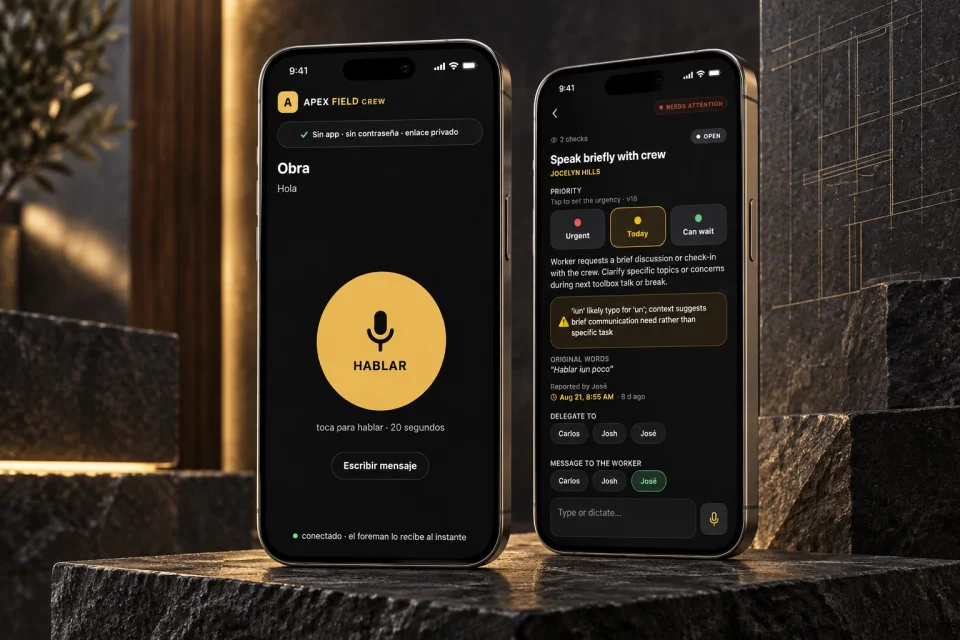
Four real app screens. One connected flow.
Jobsite language becomes a clear work item. The original stays beside it.
Examples explain the workflow. People review the situation and decide what happens next.
 JOB PHOTOSINSIDE APEX FIELD
Does the phase have supporting photos?
How much work has the GC confirmed?
How Job Photos organizes evidence · workflow diagram
Crew and managers capture photos inside the job. Sessions keep the author, date and project context together.
Set your annual work volume and assumed rework rate. See what the study’s 48% share could represent.
Check the research yourself ↗Illustrative model: volume × your rework rate × 48%. The initial 5% is an editable assumption, not a verified benchmark. This is neither your measured loss nor a promise of savings.
A person behind every update. A promise behind every home. Keep the details connected.
A link. A voice note, a typed update or a photo. Reporting should fit the workday.
The job, the person, the update and the response belong together.
Photos support the record. People review the evidence and confirm progress.
One real job. Your own crew. We help you set it up and put clearer field communication to work.
Starting with Nashville & Middle Tennessee.
Questions? Talk to the founder ↗Tell us about your company. We will contact you to arrange access and your free 9-day pilot.
No. Crew members open their assigned private link on their phone. Contact us to arrange access and set up your team.
GCs, builders, contractors and owners of trade businesses who want to test jobsite reporting and photo organization with a real crew.
Yes. Job Photos is built into the Apex Field job workflow. Both crew and managers can contribute photos. It does not require a separate CompanyCam account.
No. Photo Coverage tracks supporting evidence. Job Progress remains a separate value confirmed by the GC.
We review your experience and discuss the ongoing plan with you. The pilot is the opportunity to evaluate Apex Field on your own jobsite.
English, Spanish and Portuguese. Crew members can report by voice or text and attach photos.